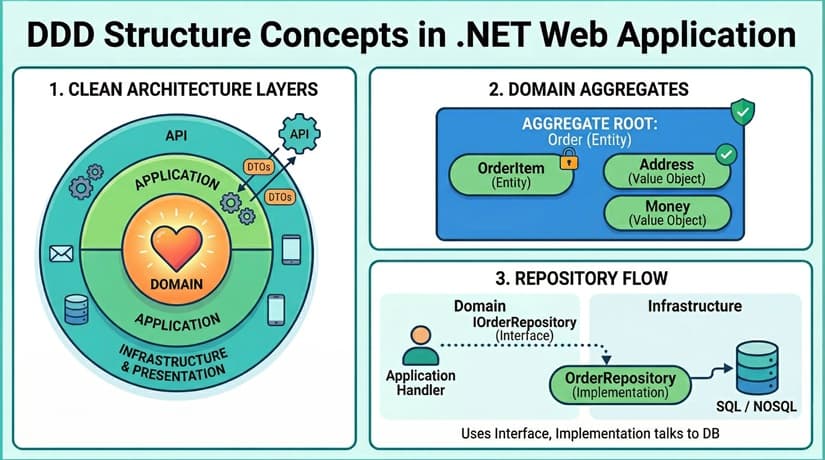
The "Clean" Project Structure
In a standard .NET solution, we split our code into four distinct projects. This separation ensures that our business rules are never "polluted" by technical details like SQL strings or HTTP status codes.
1. The Domain Layer (The Heart)
This project is at the center of everything. It contains your Entities, Aggregates, and Value Objects.
-
The Rule: This project should have zero dependencies. It doesn't know about EF Core, it doesn't know about your API, and it certainly doesn't know about your database.
-
What lives here: Your "source of truth" business logic. If an Order can't be placed without a Customer, that logic is enforced here.
2. The Application Layer (The Orchestrator)
This is where your "Use Cases" live. It defines what the system can do.
-
Where to put DTOs: Right here. DTOs (Data Transfer Objects) belong in the Application layer because they define the contract for your use cases.
-
The Workflow: This layer receives a Request DTO, uses a Repository to fetch a Domain Entity, tells the Entity to do something, and then saves it back.
3. The Infrastructure Layer (The Tools)
This handles the "how" of the application. It is the only place where technical implementation details live.
-
Where to put EF & Database Calls: All your EF Core DbContexts, Migrations, and Repository implementations live here.
-
The Interface Trick: The Domain layer defines an interface (e.g.,
IOrderRepository), but the Infrastructure layer provides the actual implementation using EF Core. This keeps your business logic decoupled from your database provider.
4. The Presentation/API Layer (The Gateway)
This is your ASP.NET Core Web API. Its only job is to accept HTTP requests, validate the basic format of the data, and hand it off to the Application layer.
Where Does Everything Go? (The Quick Reference)
When you're staring at a new file and wondering where to save it, use this table as your guide:
| Component | Project | Folder Location |
| Business Rules | .Domain |
/Aggregates or /Entities |
| DTOs (Input/Output) | .Application |
/Features/[FeatureName]/Queries |
| Interfaces (IRepository) | .Domain |
/Interfaces |
| DbContext / Migrations | .Infrastructure |
/Persistence |
| SQL / LINQ Logic | .Infrastructure |
/Repositories |
| Controllers / Program.cs | .Api |
/Controllers |
Why This Matters: The "Fat Service" Problem
Without DDD, .NET developers often fall into the trap of the "Fat Service." You end up with a OrderService.cs that is 2,000 lines long, filled with _context.Orders.Add(), validation logic, and email-sending code all mashed together.
By using DDD:
-
Validation moves into the Domain Entities.
-
Orchestration moves into small, focused Application Handlers.
-
Database logic moves into Repositories.
The result? Code that is actually readable, testable, and—dare I say—enjoyable to work on.
The Verdict
Transitioning to DDD in .NET requires more upfront "boilerplate" code. You'll spend more time creating folders and mapping DTOs to Entities. However, for any project that is expected to live longer than six months, that investment pays off in a codebase that doesn't collapse under its own weight.